নিরবিচ্ছিন্ন ইন্টারনেট সেবা পেতে অনুগ্রহ করে মেয়াদ শেষ হওয়ার পূর্বে আপনার ইন্টারনেট বিল রিচার্জ করুন। বিকাশ পে বিল: Stormnet (ISP), রেফার আইডি
নিরবিচ্ছিন্ন ইন্টারনেট সেবা পেতে অনুগ্রহ করে মেয়াদ শেষ হওয়ার পূর্বে আপনার ইন্টারনেট বিল রিচার্জ করুন। বিকাশ পে বিল: Stormnet (ISP), রেফার আইডি

নিরবিচ্ছিন্ন ইন্টারনেট সেবা পেতে অনুগ্রহ করে মেয়াদ শেষ হওয়ার পূর্বে আপনার ইন্টারনেট বিল রিচার্জ করুন। বিকাশ পে বিল: Stormnet (ISP), রেফার আইডি
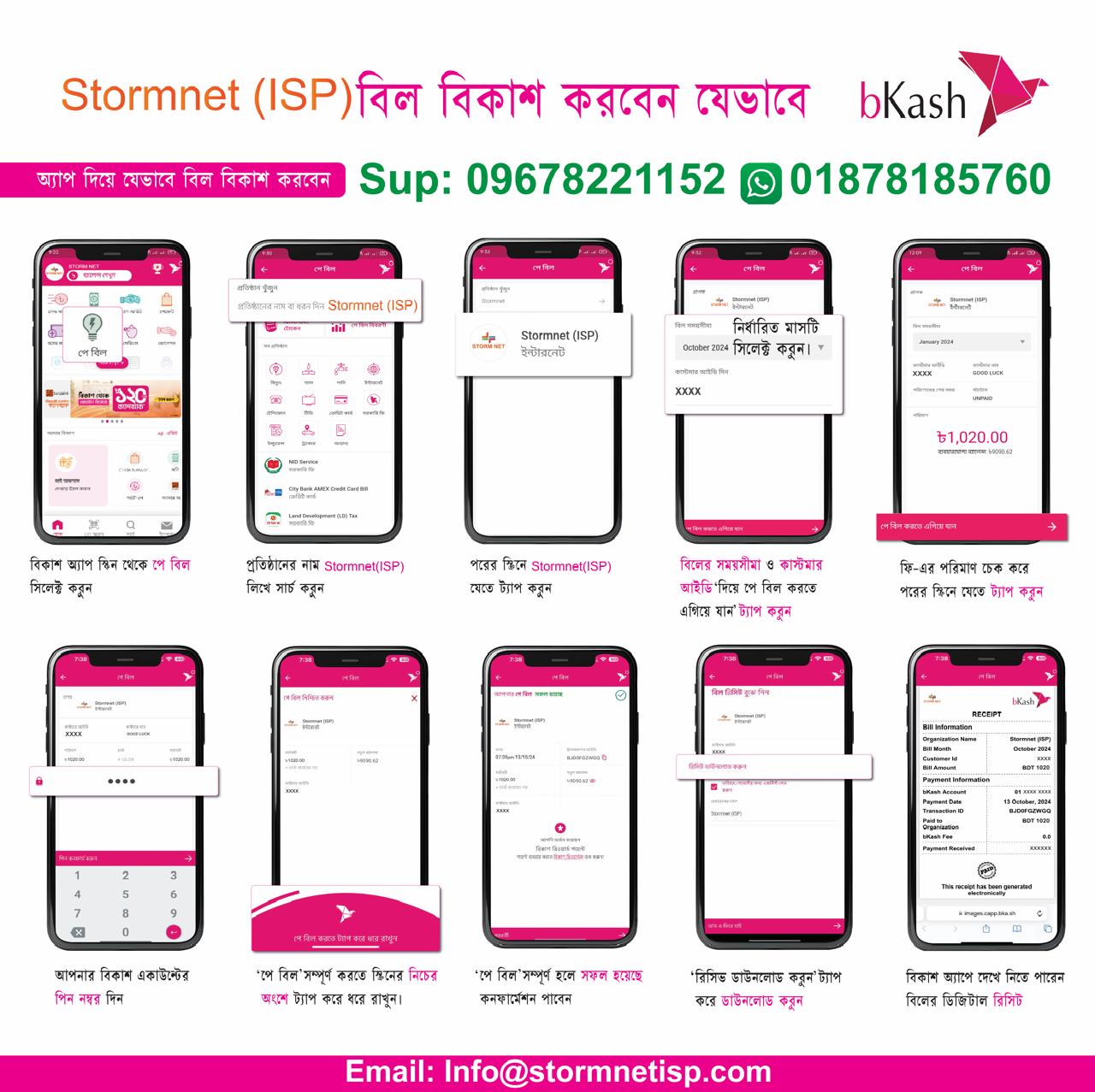
How to Pay via bKash
1
Login & Select Option
Login to your bKash app and tap on "Pay Bill" (পে বিল) option.
2
Search Biller
Search for “Stormnet ISP” and select it.
3
Enter Details & Confirm
Select timeline, enter Customer ID, amount & PIN.
✓
Confirm Payment
Enter amount, PIN, and Tap & Hold to confirm. You are done!
How to Pay via Nagad
1
Select Bill PayOpen Nagad App → Bill Pay
2
Find Stormnet ISPSearch and select merchant
✓
Pay & ConfirmEnter ID, Amount & PIN
How to Pay via Rocket
1
Select Bill PayLogin → Bill Pay
2
Biller SearchSearch Stormnet ISP
✓
Complete PaymentEnter ID, Amount & PIN
Direct Bank Transfer
Please use details from below to deposit your bill.
UCB Bank
Account Name: Storm NetAccount No: 0000000000000000
Routing No: 245331671
Branch:
BRAC Bank
Account Name: Storm NetAccount No: 0000000000000
Routing No: 60331630
Branch: